ByJohn A
Schema-per-Tenant Migrations: Running Migrations Across Thousands of Tenants
| On This Page 1. Why Migrations Are the Hardest Part of Schema-per-Tenant 2. What Is Schema-per-Tenant? 3. Why One Migration Becomes Thousands 4. Migration Architecture: A Runner Built for Thousands of Schemas 5. Zero-Downtime Migrations: The Expand-Contract Pattern 6. How to Build It: Steps, Stack, Cost, When to Choose It 7. Real Case Study: Changing a Live System Without Disruption 8. FAQs |
You add one column to one table. Now you have to apply that same change to nine thousand more schemas, in production, without breaking anyone. How do you do that and still sleep at night?
As Technology and Client Success Lead at Acquaint Softtech, I have watched one careless migration ripple across a tenant fleet and watched a disciplined one go completely unnoticed. Our hired DevOps engineers treat a fleet-wide migration as a controlled release, not a one-line command.
With schema-per-tenant, every schema change is multiplied by your tenant count, and a migration that fails halfway leaves you with a fleet running two versions at once. At that point, a migration is change management, not a quick edit: the US government’s NIST configuration-management guidance frames every change as a controlled, tracked process rather than an ad hoc one. One unbatched ALTER can lock tables for hours.
This guide covers what schema-per-tenant is, why migrations are the hard part, the architecture that tames them, the zero-downtime pattern, cost, and a real case study. It pairs with our wider SaaS product development guide. Read on, then migrate ten thousand schemas without fear.
Why Migrations Are the Hardest Part of Schema-per-Tenant
Schema-per-tenant is easy to live with day to day, and hard on the day you change the schema. Reads and writes are simple because each tenant sits in its own namespace, but a single structural change suddenly has to land safely across every tenant. Designing for that reality from the start is a software product development decision, not a surprise to meet in production.
Why is a migration riskier here than in a normal app?
In a single-tenant app, a migration runs once; here, it runs once per tenant, so the same risk is repeated thousands of times, and any flaw is amplified at scale. A change that is fine on an empty test schema can lock a large tenant’s tables for minutes. Weighing that risk before committing to the model is a virtual CTO services call.
Why does it get worse as you grow?
At a hundred tenants, a simple loop is fine; at ten thousand, it can run for hours, and the odds that at least one schema fails mid-run approach certainty. Building proper migration tooling before you reach that point is where IT staff augmentation services help.
What Is Schema-per-Tenant?
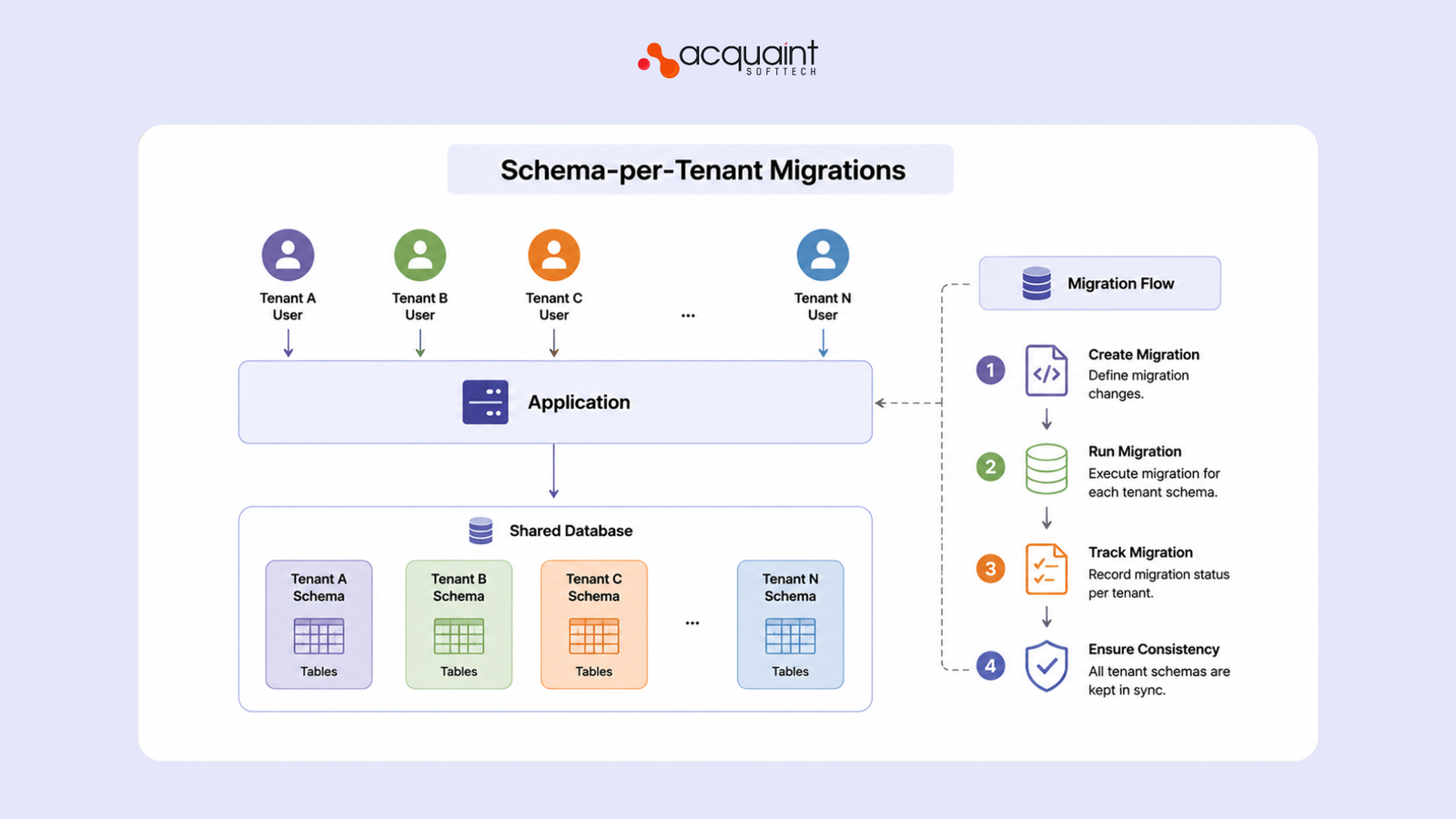
Schema-per-tenant is the model where every tenant gets its own schema, a separate namespace of tables, inside one shared database. It sits between pooled tables with a tenant ID and a full database per tenant, giving stronger isolation than a shared table without the operational weight of thousands of databases. Even a multi-site product built by hired WordPress developers can use a separate schema per site for cleaner separation.
| Model | Isolation | Migration effort | Best for |
| Pooled (shared tables) | Lower | One change, one shared table | Many small tenants, maximum scale |
| Schema-per-tenant | Medium | One change times every schema | A balance of isolation and cost |
| Database-per-tenant | Highest | One change times every database | Regulated or large enterprise tenants |
What are the benefits?
Each tenant’s data is cleanly namespaced, which makes per-tenant export and inspection simple, while a single connection pool keeps it far cheaper to run than a database per tenant. A multi-store platform built by hired WooCommerce developers can keep each store’s tables apart without paying for a separate database for each.
How is schema-per-tenant different from a database per tenant?
They sit one step apart on the isolation ladder. Database-per-tenant gives every customer a wholly separate database, which means separate connection pools, separate backups, and often separate instances, the strongest isolation and the heaviest operations.
Schema-per-tenant keeps everyone inside one database, but in separate namespaces, so you share a connection pool and a backup target while still keeping each tenant’s tables apart. The practical effect is that connections and cost are much easier in the schema model, but migrations are arguably harder, because thousands of schemas live inside a single database that one long-running change can stall.
What are the trade-offs and 2026 trends?
The price of that balance is migrations: changes must reach every schema, so the model is only as good as its migration tooling. The 2026 direction is mature tenancy packages and online schema-change tools that make fleet migrations routine. Owning that tooling over time suits a dedicated software development team.
Why One Migration Becomes Thousands
The core challenge is multiplication: a single change must be applied, in order, to every tenant schema, and each application can fail, lock, or drift. Five problems dominate. The migration tooling that handles them is often written by hire Laravel developers using the framework’s migration system as a foundation.
| Challenge | Why it hurts | How to tame it |
| Volume | The same change runs thousands of times | A batched runner over the tenant catalog |
| Long locks | A big ALTER can lock tables for hours | Online, non-blocking DDL in small steps |
| Partial failure | Some schemas migrate, some do not | Idempotent, resumable, per-schema state |
| Version skew | The fleet is briefly mixed-version | Backward-compatible, expand-contract changes |
| New tenants | Fresh schemas need every past migration | Auto-apply migrations at provisioning |
How do you track which schema is on which version?
Each schema needs its own record of which migrations it has run, either a migrations table inside the schema or a central ledger keyed by tenant, so the runner can compute and apply only what is pending. Building that tracking reliably is work for Hire Python developers as readily as any backend team.
What happens when a migration fails on schema 4,001?
Nothing catastrophic, if the runner is idempotent and resumable: it records success per schema, retries the failed one, and never re-applies a completed change, so you can fix the cause and continue from where it stopped. Implementing that resilient runner suits Django developers.
Migration Architecture: A Runner Built for Thousands of Schemas
A fleet migration runner iterates the tenant catalog, points the connection at each schema in turn, applies only the pending migrations in order, records the result per schema, and works through the fleet in controlled batches with concurrency limits.
Treating it as a release pipeline, not a script, is the whole game. The application layer that talks to the catalog is often built by hired MERN stack developers.
How do you keep one tenant’s migration from blocking the rest?
Run migrations in bounded batches with concurrency limits and health checks between waves, so a slow or locked schema delays only its batch, not the whole fleet, and a spike in failures pauses the run automatically. Building that orchestration suits MEAN stack developers.
How do new tenants stay in sync?
Every newly provisioned schema must run the full, ordered migration history before it goes live, so a tenant created today lands on the same version as one created a year ago. Treating each fleet rollout as a planned release rather than a big-bang is a software version upgrade services mindset applied across thousands of schemas.
What is the landlord schema, and why keep it separate?
Most schema-per-tenant systems keep a shared landlord schema alongside the per-tenant ones. It holds data that belongs to the platform rather than any single customer: the tenant catalog itself, billing and plan records, feature flags, and global reference tables.
Keeping it separate matters because landlord migrations and tenant migrations follow different lifecycles; you might change a global table once while applying a tenant change ten thousand times. A runner that clearly distinguishes the two avoids the trap of accidentally looping a global change across every tenant, or worse, missing a tenant change on the shared tables.
Zero-Downtime Migrations: The Expand-Contract Pattern
The expand-contract pattern is how you change a schema without downtime: first expand by adding the new structure alongside the old, deploy code that writes to both, backfill in the background, switch reads to the new shape, then contract by removing the old.
Because the application works throughout the mixed-version window, no tenant ever sees a broken state. Anomaly detection that flags a schema drifting mid-rollout is a fit for AI development services.
What are the best practices?
• Make changes backward-compatible and forward-only; avoid destructive steps.
• Expand, backfill, switch, then contract, never all at once.
• Keep each migration small and fast; add columns as nullable, backfill later.
• Run in batches with health checks and automatic pause on failures.
• Make the runner idempotent and resumable, with per-schema state.
• Rehearse against a realistic schema count in staging first.
Why avoid rollbacks across thousands of schemas?
Rolling a destructive change back across a whole fleet is slow and error-prone, which is why expand-contract favours forward-only changes that are safe to leave in place if a step pauses. Surfacing the one schema lagging among thousands is the kind of monitoring AI/ML engineers can automate.
What is a backfill, and why run it in the background?
A backfill is the step that populates a newly added column or table with data derived from what already exists, for example, filling a new status field for every historical record. Run inline during the migration, a backfill on a large tenant can lock tables and stretch the run for hours; run in the background in small chunks after the column is added, it fills gradually while the application keeps serving traffic. That separation, add the structure instantly, fill it slowly, is what keeps an expand-contract change genuinely zero-downtime even on the largest tenants in the fleet.
How do you keep migrations healthy over time?
Migration tooling is never finished: schemas drift, tenants grow at different rates, and yesterday’s safe change can become slow as a table fills. Keeping the runner, the catalog, and the rollout playbook current is a software support and maintenance services commitment.
How to Build It: Steps, Stack, Cost, When to Choose It
Building schema-per-tenant migration tooling follows a clear order: catalog the tenants, build the per-schema runner, add batching and per-schema versioning, adopt expand-contract, then wire it into deployment with monitoring. The value is shipping schema changes to a whole fleet calmly. Delivering this affordably is core software development outsourcing work.
How do you build it, step by step?
This is the order we follow on real builds:
1. Keep a catalog of every tenant and its schema.
2. Build a runner that applies pending migrations per schema, in order.
3. Track migration version per schema and make every step idempotent.
4. Run in batches with concurrency limits and health checks.
5. Adopt expand-contract so changes are backward-compatible.
6. Auto-apply the full history to every newly provisioned schema.
7. Wire migrations into deployment with monitoring and alerts.
Should you even choose schema-per-tenant?
Choose it when you want stronger isolation than shared tables but cannot justify a database per tenant, a sweet spot for mid-sized B2B SaaS. If most tenants are tiny, pooled tables scale better; if a few are huge or regulated, give those a dedicated database. Settling that split early is exactly what a product discovery workshop is for.
Read Also: Emerging Trends in Business Intelligence
How much does it cost, and what stack is best?
Most of the cost is the runner and tooling, which is a few weeks for a basic batched runner and more for zero-downtime tooling, with India-based teams delivering at up to 40% lower cost. A common stack is PostgreSQL schemas, a tenancy package such as a Laravel or Django multi-tenancy library, framework migrations driven by a fleet runner, and a job queue for batched runs; a mobile client built by React Native developers simply talks to the same migrated schemas.
| Layer | Recommended Tech | Role |
| Database | PostgreSQL schemas | One namespace per tenant in a shared DB |
| Tenancy | Laravel or Django multi-tenancy library | Route each request to the right schema |
| Migrations | Framework migrations + fleet runner | Apply changes per schema, in order |
| Batching | A job queue with concurrency limits | Run the fleet in safe waves |
| Safety | Expand-contract, online DDL | Change schemas without downtime |
Real Case Study: Changing a Live System Without Disruption
The discipline behind a safe fleet migration is the discipline of changing a live, busy production system without anyone noticing. Bitpanda, one of Europe’s largest investment platforms, needed to keep shipping web features and refactor legacy components while customers traded on the platform every day.
This is not a schema-per-tenant story specifically, but it is a textbook example of evolving a high-traffic production system without disrupting the people using it. Steering work this sensitive on milestones is where a technical project manager keeps risk under control.
Every change had to integrate into a system customers were already using daily, which is precisely the constraint a fleet migration imposes. More builds sit on our case studies page. Teams evolving live, high-traffic systems like this often hire remote developers with production and DevOps experience to keep changes safe.
FAQs
What is schema-per-tenant?
Schema-per-tenant is a multi-tenant SaaS model where each customer has a separate database schema. All schemas share the same database infrastructure. It provides better isolation than shared tables while reducing costs.
Why are migrations hard in schema-per-tenant?
Every schema must receive the same database update. Failures or table locks can affect individual tenants differently. Managing thousands of schemas requires careful coordination.
What features does a schema-per-tenant migration system need?
A migration system needs tenant tracking, version control, and automated runners. It should support batching, retries, and health checks. Zero-downtime deployment capabilities are also important.
How do you run migrations with zero downtime?
Use the expand-contract migration pattern. Add new structures first, migrate data gradually, and switch traffic safely. Remove old structures only after validation is complete.
How much does schema-per-tenant cost to build?
| Solution Type | Cost (USD) |
| Basic Schema-per-Tenant Setup | $15,000 – $30,000 |
| Automated Migration Platform | $30,000 – $60,000 |
| Enterprise Zero-Downtime System | $60,000+ |
How long does it take to develop?
A basic schema-per-tenant solution can be built within a few weeks. Advanced migration and monitoring tools require additional time. Timelines depend on platform complexity and tenant volume.
What tech stack is best for schema-per-tenant?
PostgreSQL schemas are a popular choice for tenant isolation. Laravel and Django provide strong multi-tenancy support. Job queues and monitoring tools help manage migrations safely.
Why choose schema-per-tenant over shared tables?
Schema-per-tenant offers stronger tenant isolation and easier customization. It reduces the risk of data leakage between customers. Many SaaS platforms use it as a balance between security and cost.
Can schema-per-tenant improve SaaS scalability?
Yes, it supports growth while keeping tenant data organized. Individual schemas can be managed independently when needed. This approach works well for medium to large SaaS platforms.
What is the best use case for schema-per-tenant?
Schema-per-tenant is ideal for SaaS products needing stronger isolation without separate databases. It balances performance, security, and operational complexity. Growing B2B SaaS platforms commonly adopt this model.